PC가 아닌 Kuernetes에 Container 형태로 vLLM을 설치 및 서비스해보자. 마침 VM size(NC40ads H100 v5) 40vcpus, 320 GiB memory의 Node pool이 존재하여 해당 자원을 활용하기로 한다.
설치하기
설치된 AKS에서 진행하는데 기존에 Ollama로 LLM을 간단하게 서비스하고 있었던 점을 참고하자.
[참고] vllm docs
우선 GitHub Repository를 clone하여 helm chart를 확인하자.
mango@mac llm % git clone https://github.com/vllm-project/production-stack.git
Cloning into 'production-stack'...
remote: Enumerating objects: 5036, done.
remote: Counting objects: 100% (1278/1278), done.
remote: Compressing objects: 100% (489/489), done.
remote: Total 5036 (delta 949), reused 789 (delta 789), pack-reused 3758 (from 2)
Receiving objects: 100% (5036/5036), 6.65 MiB | 22.69 MiB/s, done.
Resolving deltas: 100% (3051/3051), done.
values.yaml 작성하기
https://github.com/vllm-project/production-stack/blob/main/helm/values.yaml
production-stack/helm/values.yaml at main · vllm-project/production-stack
vLLM’s reference system for K8S-native cluster-wide deployment with community-driven performance optimization - vllm-project/production-stack
github.com
values.yaml 파일을 복사(values-gpt-oss-120b.yaml)하여 아래와 같이 modelSpec을 작성하였다.
..생략..
  modelSpec:
    - name: "gpt-oss-120b"
      annotations:
        model: "gpt-oss-120b"
      podAnnotations:
        model: "gpt-oss-120b"
      repository: "lmcache/vllm-openai"
      tag: "latest"
      imagePullPolicy: "Always"
      modelURL: "openai/gpt-oss-120b"
      replicaCount: 1

      # Standard NC40ads H100 v5: 40 vCPUs, 320 GiB memory
      requestCPU: 38
      requestMemory: "300Gi"
      limitCPU: "38"
      limitMemory: "310Gi"
      requestGPU: 1

      # Storage for large model
      pvcStorage: "300Gi"
      pvcAccessMode:
        - ReadWriteOnce
      storageClass: "managed-csi-premium"

      # Shared memory for large model
      shmSize: "64Gi"

      # vLLM configuration for 120B model
      vllmConfig:
        enableChunkedPrefill: true
        enablePrefixCaching: false
        maxModelLen: 16384
        dtype: "bfloat16"
        tensorParallelSize: 1
        maxNumSeqs: 16
        gpuMemoryUtilization: 0.95
        extraArgs: ["--disable-log-requests", "--trust-remote-code"]

      # Node selector for Standard NC40ads H100 v5
      # Node pool에 gpu:true 라벨이 설정되어 있음
      nodeSelectorTerms:
        - matchExpressions:
          - key: gpu
            operator: "In"
            values:
            - "true"
..생략..
Helm 설치
설치 명령어를 수행하자 아래와 같이 정상적으로 결과가 출력된다. 하지만, vllm-stack-deployment-router Pod가 자꾸 재기동되는 현상이 발견되어 values-gpt-oss-120b.yaml 을 추가로 수정했다.
mango@mac helm % helm install vllm-stack . -f values-gpt-oss-120b.yaml -n vllm --create-namespace
NAME: vllm-stack
LAST DEPLOYED: Tue Dec 30 15:34:26 2025
NAMESPACE: vllm
STATUS: deployed
REVISION: 1
DESCRIPTION: Install complete
TEST SUITE: None
변경사항: startupProbe의 initialDelaySeconds 증가.
..생략..
routerSpec:
..생략..
  # Startup probe configuration.
  # Router 이미지가 크고(5GB+) 시작 시간이 오래 걸리므로 여유있게 설정
  startupProbe:
    initialDelaySeconds: 60
    periodSeconds: 10
    failureThreshold: 12
    httpGet:
      path: /health
..생략..
Helm upgrade
아래 Chart의 revision을 보면 5까지 올라간 것을 확인할 수 있다. Persistent Volume Claim에서 Storage Class 선언 관련하여 수차례 삽질한 결과이다. (위 values에는 AKS에서 기본 제공하는 storageClass 수정한 것으로 최종본 반영되어있다.)
mango@mac helm % helm upgrade vllm-stack . -f values-gpt-oss-120b.yaml -n vllm
Release "vllm-stack" has been upgraded. Happy Helming!
NAME: vllm-stack
LAST DEPLOYED: Tue Dec 30 16:07:47 2025
NAMESPACE: vllm
STATUS: deployed
REVISION: 5
DESCRIPTION: Upgrade complete
TEST SUITE: None
vllm-stack-deployment-router 점검
일단 router Pod가 기동되었으니, 중간 점검을 진행해보자. 아직 Ingress를 정의하지 않았으므로 Service의 vllm-stack-router-service를 Port-Forward하자.
mango@mac llm % k port-forward svc/vllm-stack-router-service 8000:80 -n vllm
Forwarding from 127.0.0.1:8000 -> 8000
Forwarding from [::1]:8000 -> 8000
익숙한 Swagger UI가 출력되는 것이 확인된다. 다만, model이 로딩되지 않았는데 무엇이 문제인지 찾아보자.
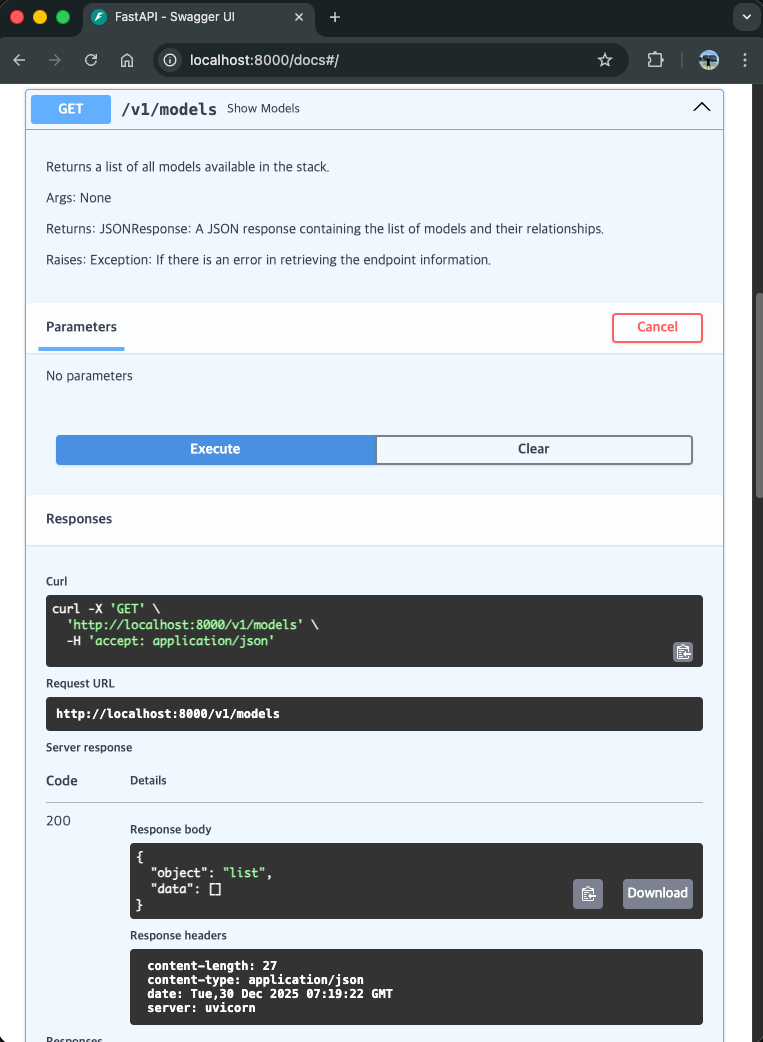
vllm-stack-gpt-oss-120b-deployment-vllm Pod 기동하기
Deployment에는 별다른 Event가 없고, 한참 찾다가 ReplicaSet에 아래와 같은 Event가 있는 것을 발견했다ㅠ
Error creating: pods "vllm-stack-gpt-oss-120b-deployment-vllm-84497cf857-" is forbidden: pod rejected: RuntimeClass "nvidia" not found
아래와 같이 Cluster에 해당하는 runtimeclass(nvidia)가 존재하지 않았다.
mango@mac helm % k get runtimeclass
NAME                     HANDLER   AGE
kata-mshv-vm-isolation   kata      87d
kata-vm-isolation        kata      87d
runc                     runc      87d
values-gpt-oss-120b.yaml 파일의 내용을 아래와 같이 빈값으로 수정하니, vllm-stack-gpt-oss-120b-deployment-vllm Pod가 기동되기 시작한다. 참고로 nvidia-device-plugin-daemonset 은 별도 설치해두었다. 나중에 성능 이슈 발생시 확인해보자.
..생략..
servingEngineSpec:
..생략..
  runtimeClassName: ""
..생략..
역시나 이 Pod도 Model 로딩 시간이 오래 걸려서 그런가 'Container vllm failed startup probe, will be restarted' 이벤트를 출력하며 재기동된다. Startup probe를 수정하자.
..생략..
servingEngineSpec:
..생략..
  # -- Startup probe configuration
  # 120B 모델은 시작하는데 매우 오래 걸리므로 여유있게 설정
  # - 모델 다운로드 시간
  # - 모델을 GPU 메모리에 로드하는 시간
  # - vLLM 서버 초기화 시간
  startupProbe:
    # -- Number of seconds after the container has started before startup probe is initiated
    initialDelaySeconds: 300
    # -- How often (in seconds) to perform the startup probe
    periodSeconds: 30
    # -- Number of times after which if a probe fails in a row, Kubernetes considers that the overall check has failed: the container is not ready
    failureThreshold: 30
    # -- Timeout for each probe attempt
    timeoutSeconds: 10
    # -- Configuration of the Kubelet http request on the server
    httpGet:
      # -- Path to access on the HTTP server
      path: /health
      # -- Name or number of the port to access on the container, on which the server is listening
      port: 8000
..생략..
참고로 Pod의 로그를 살펴보면 아래와 같이 무지막지하게 시간이 오래 걸리는 것을 확인할 수 있다.
(EngineCore_DP0 pid=213) INFO 12-30 08:15:15 [mxfp4.py:165] Using Triton backend
(EngineCore_DP0 pid=213) INFO 12-30 08:19:22 [weight_utils.py:487] Time spent downloading weights for openai/gpt-oss-120b: 246.795983 seconds
(EngineCore_DP0 pid=213) Loading safetensors checkpoint shards:   0% Completed | 0/15 [00:00<?, ?it/s]
(EngineCore_DP0 pid=213) Loading safetensors checkpoint shards:   7% Completed | 1/15 [00:45<10:39, 45.67s/it]
(EngineCore_DP0 pid=213) Loading safetensors checkpoint shards:  13% Completed | 2/15 [01:23<08:50, 40.84s/it]
(EngineCore_DP0 pid=213) Loading safetensors checkpoint shards:  20% Completed | 3/15 [02:07<08:27, 42.30s/it]
(EngineCore_DP0 pid=213) Loading safetensors checkpoint shards:  27% Completed | 4/15 [02:46<07:30, 40.93s/it]
(EngineCore_DP0 pid=213) Loading safetensors checkpoint shards:  33% Completed | 5/15 [03:28<06:53, 41.36s/it]
(EngineCore_DP0 pid=213) Loading safetensors checkpoint shards:  40% Completed | 6/15 [04:08<06:09, 41.04s/it]
(EngineCore_DP0 pid=213) Loading safetensors checkpoint shards:  47% Completed | 7/15 [04:53<05:37, 42.20s/it]
(EngineCore_DP0 pid=213) Loading safetensors checkpoint shards:  53% Completed | 8/15 [05:31<04:46, 40.99s/it]
(EngineCore_DP0 pid=213) Loading safetensors checkpoint shards:  60% Completed | 9/15 [06:16<04:13, 42.31s/it]
(EngineCore_DP0 pid=213) Loading safetensors checkpoint shards:  67% Completed | 10/15 [06:56<03:27, 41.58s/it]
(EngineCore_DP0 pid=213) Loading safetensors checkpoint shards:  73% Completed | 11/15 [07:43<02:52, 43.03s/it]
(EngineCore_DP0 pid=213) Loading safetensors checkpoint shards:  80% Completed | 12/15 [08:23<02:06, 42.12s/it]
테스트
아래와 같이 기본적인 채팅에 대한 응답을 확인할 수 있었다.
curl --location 'http://localhost:8000/v1/chat/completions' \
--header 'Content-Type: application/json' \
--data '{
    "model": "openai/gpt-oss-120b",
    "messages": [
        {
            "role": "system",
            "content": "You are a helpful assistant."
        },
        {
            "role": "user",
            "content": "vLLM을 Docker로 기동하는 것과 Python으로 기동하는 것의 차이와 장단점은?"
        }
    ]
}'
응답결과는 아래와 같으며, 답변 및 추론 과정 그리고 Token 사용에 대한 정보도 확인 가능했다.
{
    "id": "chatcmpl-a85f97d3e5f135cf18778ee4bba13797",
    "object": "chat.completion",
    "created": 1767587108,
    "model": "openai/gpt-oss-120b",
    "choices": [
        {
            "index": 0,
            "message": {
                "role": "assistant",
                "content": "## vLLM 실행 방식 비교  \n| 구분 | Docker 로 실행 | Python 스크립트(직접 실행) |\n|------|----------------|---------------------------|\n| **배포·재현성** | - 이미지에 OS·라이브러리·CUDA·PyTorch·vLLM 모두 포함 → 어느 머신에서든 똑같이..",
..생략..
                "reasoning": "The user asks in Korean: \"vLLM을 Docker로 기동하는 것과 Python으로 기동하는 것의 차이와 장단점은?\" They want differences and pros/cons of launching vLLM (a language model inference engine) via Docker vs via Python directly..",
                "reasoning_content": "The user asks in Korean: \"vLLM을 Docker로 기동하는 것과 Python으로 기동하는 것의 차이와 장단점은?\" They want differences and pros/cons of launching vLLM (a language model inference engine) via Docker vs via Python directly.."
            },
..생략..
    "usage": {
        "prompt_tokens": 105,
        "total_tokens": 4580,
        "completion_tokens": 4475,
        "prompt_tokens_details": null
    },
..생략..
}
기타. 이슈
vllm-router OOME
이제 잘 되려나 하고 테스트하다보면 router가 간간히 재기동되는 경우가 있다. 로그는 Node에 아래와 같이 떨어졌다ㅠ
Memory cgroup out of memory: Killed process 220258 (vllm-router) total-vm:5106464kB, anon-rss:500080kB, file-rss:65360kB, shmem-rss:0kB, UID:0 pgtables:2712kB oom_score_adj:938
resource가 타이트하게 잡혀있는 것 같아 values-gpt-oss-120b.yaml을 수정해서 memory로 인한 재기동을 해결했다.
..생략..
routerSpec:
..생략..
  # -- router resource requests and limits
  # Router가 OOMKilled 되지 않도록 메모리를 충분히 할당
  # 실제 사용량: anon-rss ~500MB + file-rss ~65MB + overhead
  resources:
    requests:
      cpu: 400m
      memory: 1Gi
    limits:
      cpu: 1000m
      memory: 2Gi
'Engineering > AI' 카테고리의 다른 글
| Open WebUI 설치 w/AKS (0) | 2026.01.06 |
|---|---|
| vLLM 설치 및 실행 w/macOS (0) | 2025.12.29 |
| Docker LLM 설치하기 w/Ollama (0) | 2025.12.29 |
| 로컬(macOS) LLM 설치하기 w/Ollama (0) | 2025.12.24 |